
Prometheus & Grafana
Overview
Section titled “Overview”OKStatus exposes the state of every monitor of your organization in the Prometheus format, on one URL:
https://api.okstatus.eu/api/v1/metricsPoint your Prometheus (or Grafana Alloy, VictoriaMetrics, Grafana Cloud…) at it and OKStatus becomes one more source in the stack you already run: the external view of your services, next to your internal metrics.
Available on the Pro plan and above.
Create a Metrics key
Section titled “Create a Metrics key”- Go to Settings → API Keys.
- On Pro, the key type is Metrics. On Max and Enterprise, pick Metrics under Access (it’s preselected when the name contains “prometheus” or “grafana”).
- Name the key, then click Generate a Prometheus key.
- Copy the key: it’s shown once.
A Metrics key reads /api/v1/metrics and nothing else. If it leaks from a
config file or a Git repository, it can’t read the rest of the API, and it
can’t change or delete anything. See API keys and access
levels.
Configure Prometheus
Section titled “Configure Prometheus”Save the key in a file Prometheus can read, never in prometheus.yml itself:
umask 077printf '%s' 'oks_live_…' > /etc/prometheus/okstatus.tokenThen add the target:
scrape_configs: - job_name: okstatus scrape_interval: 30s scheme: https metrics_path: /api/v1/metrics authorization: credentials_file: /etc/prometheus/okstatus.token static_configs: - targets: [api.okstatus.eu]Grafana Alloy:
prometheus.scrape "okstatus" { targets = [{ "__address__" = "api.okstatus.eu" }] scheme = "https" metrics_path = "/api/v1/metrics" scrape_interval = "30s" authorization { credentials_file = "/etc/alloy/okstatus.token" } forward_to = [prometheus.remote_write.default.receiver]}Prometheus Operator (kube-prometheus-stack): store the key in a Secret, then:
apiVersion: monitoring.coreos.com/v1alpha1kind: ScrapeConfigmetadata: name: okstatusspec: scheme: HTTPS metricsPath: /api/v1/metrics scrapeInterval: 30s authorization: type: Bearer credentials: name: okstatus-token # Secret with the key under "token" key: token staticConfigs: - targets: [api.okstatus.eu]Check the key from a terminal:
curl -s -H "Authorization: Bearer $(cat /etc/prometheus/okstatus.token)" \ https://api.okstatus.eu/api/v1/metrics | grep okstatus_monitor_upScrape interval and limits
Section titled “Scrape interval and limits”- The answer is computed once and cached 15 seconds per organization: scraping more often than every 15 s returns the same figures. 30 s or 60 s is a good interval.
- Each organization can scrape 60 times a minute, in a budget separate from the rest of the API (your Terraform runs and scripts don’t compete with Prometheus). Two Prometheus servers in high availability fit easily.
- Responses are gzip-compressed when Prometheus asks for it (it always does).
Grafana dashboard
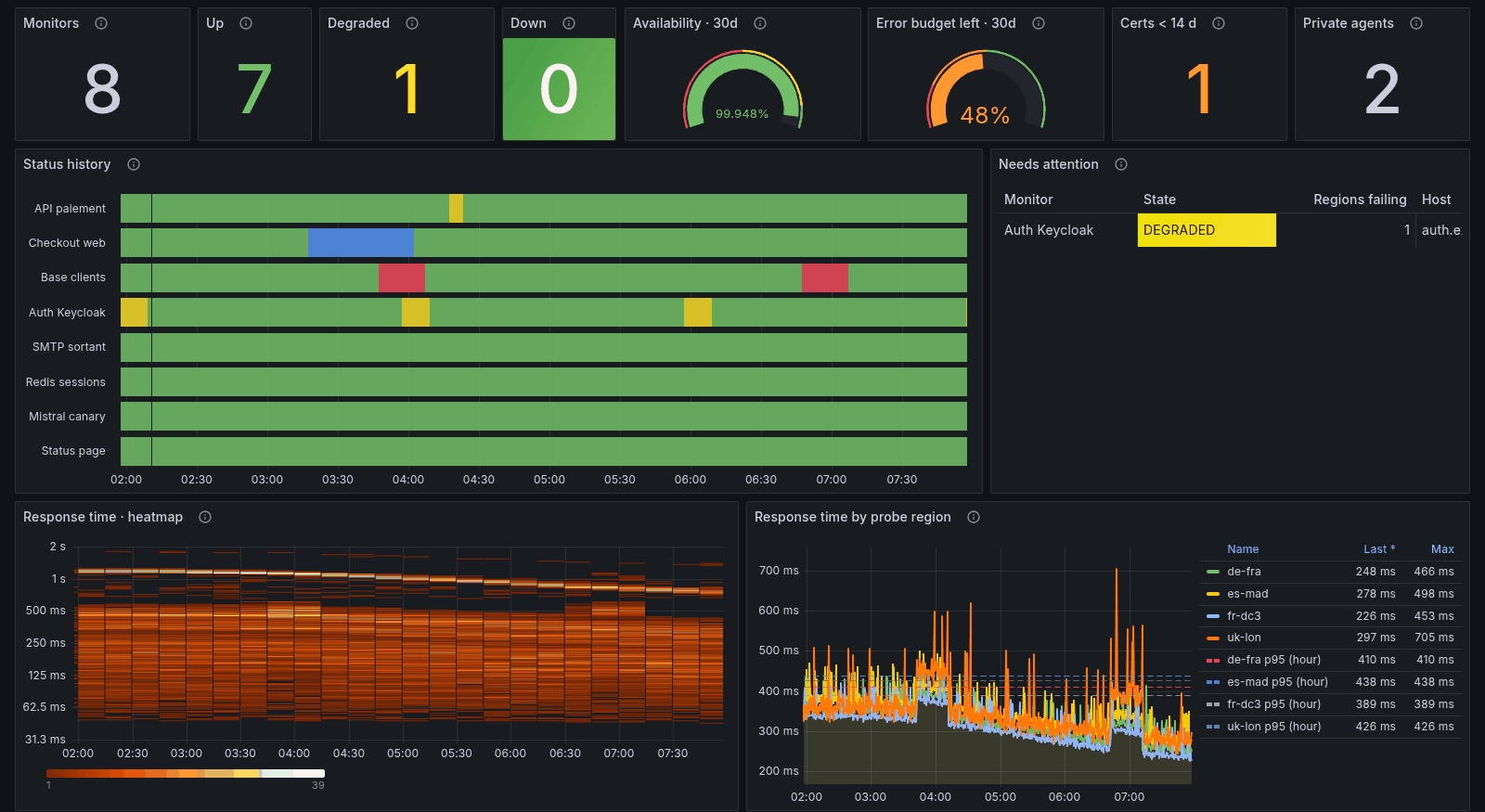
Section titled “Grafana dashboard”The OKStatus · Uptime overview dashboard is built on these metrics only:
- monitors up, degraded and down, mean availability and the error budget left against your SLA target;
- a status history of every monitor;
- a response time heatmap and response times per probe region;
- the last check of every monitor from every probe region;
- availability of each monitor against the SLA target;
- a table of every monitor with its state, latency, availability over 24 h, 7 days and 30 days, and days before its certificate expires;
- upcoming certificate and domain expirations;
- your private agents: liveness, version and load;
- collapsed rows for AI model monitors (time to first token) and per-monitor SLA detail.
Filters at the top: monitor group, monitor, probe region and SLA window.
Import it: in Grafana, Dashboards → New → Import, type the ID 25909 and click Load, then pick your Prometheus data source. The dashboard is published on grafana.com; without internet access from Grafana, upload okstatus-uptime-overview.json instead. Its source, with the alerting rules, is on GitHub.
Alerting rules
Section titled “Alerting rules”okstatus-alerts.yml holds ten ready-to-use Prometheus rules:
| Alert | When |
|---|---|
OKStatusMonitorDown | a monitor is down (majority of its probe regions) |
OKStatusMonitorDegraded | degraded for 10 minutes |
OKStatusProbeRegionDown | one probe region fails for 15 minutes while the monitor isn’t down |
OKStatusCertificateExpiresSoon | a TLS certificate expires within 14 days (critical within 3 days) |
OKStatusDomainExpiresSoon | a domain expires within 30 days |
OKStatusSlaTargetMissed | 30-day availability below the monitor’s SLA target, or the organization’s |
OKStatusMonitorStale | no check for three intervals, outside a pause or a maintenance |
OKStatusPrivateAgentDown | a private agent stopped sending heartbeats |
OKStatusExportUnreachable | Prometheus can’t scrape the export (key revoked or expired, plan, network) |
Load the file with rule_files: in prometheus.yml, or wrap its groups:
in a PrometheusRule for the Prometheus Operator. In
OKStatusExportUnreachable, set job to your scrape job name.
Metrics reference
Section titled “Metrics reference”Every series about a monitor carries monitor_id, monitor_name,
monitor_type, monitor_host and, when the monitor is in a group,
monitor_group. monitor_host is the host (and port) only: never the
scheme, the path, the query string or credentials, which can contain secrets.
| Metric | Labels | Meaning |
|---|---|---|
okstatus_monitor_up | 1 up or degraded, 0 down. Absent while paused, in maintenance, pending or stale | |
okstatus_monitor_status | state | one series per state (up, degraded, down, paused, maintenance, pending, stale), 1 for the current one |
okstatus_monitor_info | regions | always 1, carries the monitor’s metadata |
okstatus_monitor_check_interval_seconds | configured check interval | |
okstatus_region_up | probe_region | last check from that region: 1 up or degraded, 0 down |
okstatus_check_latency_seconds | probe_region | response time of the last check |
okstatus_check_status_code | probe_region | HTTP status code of the last check |
okstatus_check_timestamp_seconds | probe_region | when the last check ran |
okstatus_check_latency_hourly_seconds | probe_region, percentile | p50, p95, p99 over the latest hourly rollup (every check, not only scraped samples) |
okstatus_monitor_availability_ratio | window | availability over 24h, 7d, 30d, 0 to 1: the figure of the dashboard and SLA reports |
okstatus_monitor_downtime_seconds | window | time spent down over the window |
okstatus_monitor_sla_target_ratio | SLA target set on the monitor, 0 to 1 | |
okstatus_org_sla_target_ratio | organization-wide SLA target, 0 to 1 | |
okstatus_certificate_expiry_timestamp_seconds | TLS certificate expiry (day precision) | |
okstatus_domain_expiry_timestamp_seconds | domain | domain registration expiry |
okstatus_push_last_received_timestamp_seconds | heartbeat monitors: last ping received | |
okstatus_llm_time_to_first_token_seconds | probe_region | AI model monitors: time to first token |
okstatus_llm_time_per_output_token_seconds | probe_region | AI model monitors: time per output token |
okstatus_private_agent_up | agent_id, agent_name | 1 if a heartbeat arrived in the last 90 seconds |
okstatus_private_agent_info | site, version, platform | always 1 |
okstatus_private_agent_last_heartbeat_timestamp_seconds | agent_id, agent_name | last heartbeat |
okstatus_private_agent_active_checks | agent_id, agent_name | checks running right now |
okstatus_private_agent_max_concurrent_checks | agent_id, agent_name | concurrency ceiling of the agent |
okstatus_exporter_generated_timestamp_seconds | when this answer was computed | |
okstatus_exporter_info | version | exporter version, always 1 |
Units follow the Prometheus conventions: seconds, ratios from 0 to 1, Unix
timestamps. The probe region is probe_region rather than region, which
many Prometheus setups already use as an external label.
Useful queries
Section titled “Useful queries”# Days before each certificate expires(okstatus_certificate_expiry_timestamp_seconds - time()) / 86400
# Monitors down right nowokstatus_monitor_up == 0
# Mean response time per probe regionavg by (probe_region) (okstatus_check_latency_seconds)
# Seen down from outside while your blackbox probe sees it up:# a DNS, CDN or routing issue, not the service itselfokstatus_monitor_up == 0 and on (monitor_host) label_replace(probe_success == 1, "monitor_host", "$1", "instance", "https?://([^/]+).*")Errors
Section titled “Errors”| Status | Meaning |
|---|---|
401 | missing, invalid, revoked or expired key |
403 | the organization’s plan doesn’t include the export, or the key’s access doesn’t allow it |
429 | more than 60 scrapes a minute: that scrape fails, the next interval goes through |