
Private Agents
Overview
Section titled “Overview”A private agent runs inside your own infrastructure and monitors services OKStatus can’t reach from the public internet — internal APIs, databases, intranet apps. It pulls its checks from OKStatus over outbound HTTPS only: nothing to expose, no inbound port, no VPN. Available on the Max plan and above (Max: 5 agents, Enterprise: 20).
Deploy
Section titled “Deploy”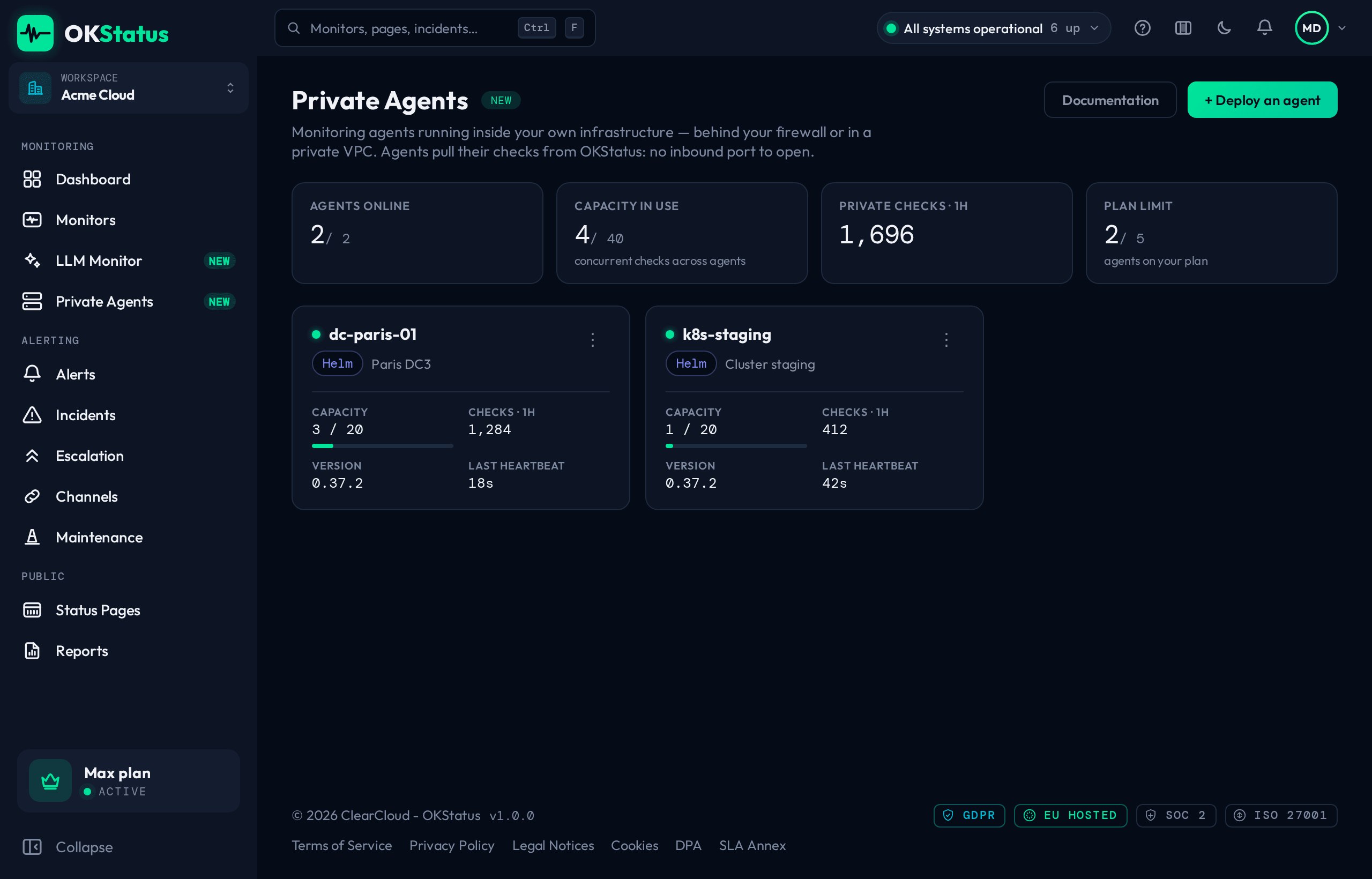
Click Deploy an agent and pick how it will run: Binary (systemd) on a Linux host, Docker, Helm (Kubernetes), or Stateless (env vars). The dialog gives you the exact command for each. The rest of this section follows the Helm chart, where there are two ways to give the agent its identity — pick one.
Recommended: stateless credentials
Section titled “Recommended: stateless credentials”Enroll once to obtain the long-lived credential pair, then run the agent from a Secret — no token to spend, no volume to persist, resilient to any restart or reschedule:
helm install okstatus-agent okstatus/private-agent \ --set credentials.agentId=<agentId> \ --set credentials.agentSecret=<agentSecret>You get the pair from the Private Agents page: open the agent’s menu (⋮) → Stateless credentials, or pick the Kubernetes (env) tab in the deploy dialog and click Generate credentials. The secret is shown once; generating again replaces it.
For a plain Deployment (no Helm), the equivalent environment variables are
OKSTATUS_AGENT_ID, OKSTATUS_AGENT_SECRET, OKSTATUS_AGENT_NAME and
AGGREGATOR_URL=https://backend.okstatus.eu.
Legacy: single-use token
Section titled “Legacy: single-use token”The agent exchanges the token on first boot and persists the result in a small PVC (required — without it a restart needs a new token):
helm install okstatus-agent okstatus/private-agent \ --set token=oksa_live_xxxxxxxxThe token comes from the Private Agents page and is single-use.
What the page shows
Section titled “What the page shows”The four figures at the top cover the fleet: agents online out of those enrolled, checks in flight against the total capacity, checks run over the last hour, and how many agents are behind the latest version. Selecting an agent opens its detail: concurrent checks, checks and failure rate over the last hour, a heartbeat strip for the last 60 minutes (one missed heartbeat shows as a gap), its version, host name, private IP, platform and uptime.
An agent that has been deployed but has not connected yet shows Waiting for first connection.
One agent = one running instance
Section titled “One agent = one running instance”A private agent’s credentials are a single identity. Run exactly one pod per credential:
- The chart ships
replicas: 1andstrategy: Recreateon purpose — neverRollingUpdate(its surge would briefly run two pods and double this agent’s heartbeats and checks). - The server enforces it too. If a second instance starts with the same
credentials, the backend’s single-instance lease rejects it with
409and that pod exits, logging “another instance of this agent is already running”. So scalingreplicasup, or applying a second Deployment with the same credentials, does not give you more throughput — the extras just exit.
On a graceful restart the departing pod releases its lease, so a replacement takes over immediately; after a hard kill a replacement takes over within ~2–3 minutes.
Create and test a monitor on an agent
Section titled “Create and test a monitor on an agent”When your organization has at least one private agent, the New monitor dialog first asks where the checks run from:
- OKStatus network — the public regions, for anything reachable from the internet;
- My private agents — pick one or more of your agents right there. Internal
addresses (
10.0.0.5,redis.internal,*.svc.cluster.local…) are allowed.
In agent mode the button becomes Test from agent: the test is run by the
first agent you selected, from inside your network, and its real answer shows
up in the dialog (for example REDIS · bureau-lyon). It is a one-shot probe —
nothing is stored, no alert is sent, the monitor’s status doesn’t change. The
same applies to the Test button of the edit panel for a monitor whose
regions are all private.
| Message | What to do |
|---|---|
| No private agent is online | The agent hasn’t sent a heartbeat for 5 minutes: check the pod or service. |
| Agent … is too old to run tests | Update the agent image. Monitoring keeps working; only the Test button needs the new build. |
| Agent … did not answer within 25 s | The agent is online but busy or cut off from backend.okstatus.eu: check its logs. |
Monitor credentials stay encrypted
Section titled “Monitor credentials stay encrypted”The credentials a monitor carries — custom headers and body, Basic auth, database, SMTP, IMAP or Redis passwords, an AI provider’s API key — are encrypted for the agent that runs the check before they leave OKStatus. Each agent derives a key pair from its own secret and publishes only the public half; the credentials travel encrypted through the check queue, and only that agent can open them. Nothing to configure: rotating the agent’s secret rotates its key.
This needs agent 1.1.0 or later (image okstatus-agent 1.1.0, Helm chart
private-agent 0.6.0). An older agent cannot read these credentials: update it,
otherwise its monitors that carry credentials are not run and the Test
button reports that the agent has no encryption key yet.
Resilience
Section titled “Resilience”- Stateless (credentials) mode needs no persistent volume — the pod loads its identity from the Secret every boot and never re-enrolls.
- Token mode needs
persistence.enabled(a PVC) so the credential the agent enrolls for survives restarts; without it, a restart requires a rotated token.
Troubleshooting
Section titled “Troubleshooting”| Symptom | Cause / fix |
|---|---|
enrollment token rejected — already used or revoked | The single-use token was already spent (or you’re in token mode without a PVC, so it re-enrolls each boot). Rotate the token and upgrade, or switch to stateless credentials. |
| CrashLoopBackOff right after deploy | Almost always the token above, or credentials Secret keys named wrong (must be agentId / agentSecret). |
409 / “another instance is already running” | Two pods share one credential. Keep replicas: 1; deploy a separate agent for more capacity. |
| Agent never appears on the dashboard | Check outbound HTTPS egress to backend.okstatus.eu, and kubectl logs on the pod. |
401 INVALID_AGENT_ID, or the agent exits at boot complaining about the id | OKSTATUS_AGENT_ID holds the agent’s name — it must be its UUID (agent menu → Stateless credentials). |
401 UNAUTHORIZED in stateless mode, or the agent exits complaining about the secret | OKSTATUS_AGENT_SECRET holds the oksa_live_… enrollment token — it must be the oksas_… secret. Generate one from the agent menu. |