
Alerts log
What a row tells you
Section titled “What a row tells you”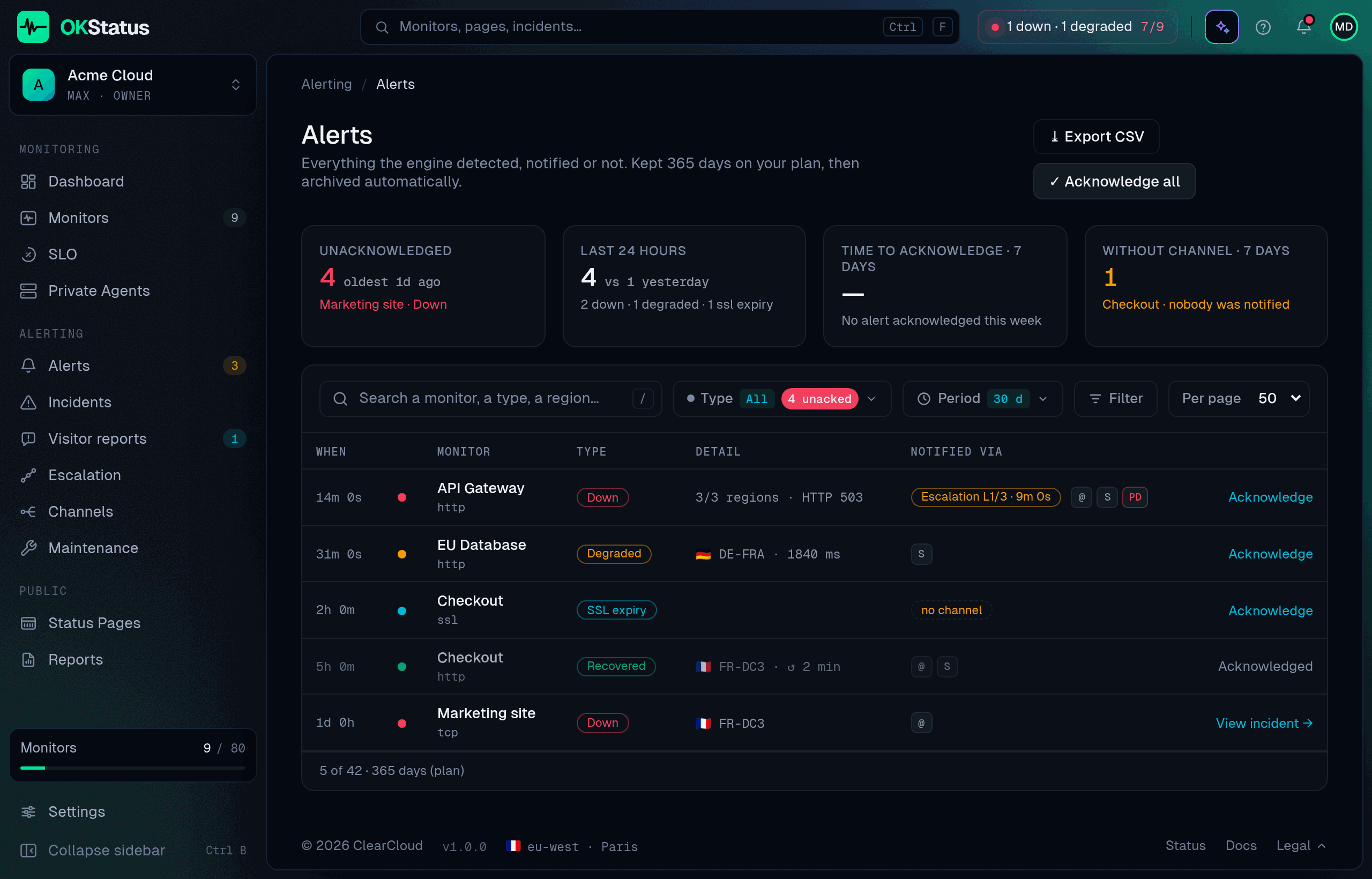
Alerting → Alerts lists every alert the engine raised for your organisation, one row per event:
- When and which monitor, with its type.
- Type — Down, Partial outage (with the failing regions out of the total), Degraded, Recovered (with the total downtime), SSL expiry.
- Detail — HTTP status, latency, region.
- Notified via — one icon per channel that was called, ✓ delivered or ✗ failed. A dashed “no channel” badge means the alert was detected but nothing was attached to that monitor: nothing was sent, and the row is your reminder to fix it.
- Acknowledge — marks an alert as seen. It clears the sidebar badge and stops the next escalation level. “Acknowledge all” applies to the rows matching the current filters.
Filters: period (24 h, 7 d, 30 d, or the whole retention), type, acknowledgement, delivery (including “without channel”), and a search on monitor, type or region. Export CSV downloads the filtered list.
The four tiles above the list answer the questions the rows only hint at: how many alerts are unacknowledged and how old the oldest is, what happened over the last 24 hours, how long your team takes to acknowledge, and how many alerts of the last 7 days reached nobody because no channel was attached.
Clicking a row opens the detail drawer: detection → notifications → acknowledgement → linked incident, plus Create an incident (title, severity and monitor pre-filled, the alert is linked to the incident once created) and a shortcut to the monitor. Under Deliveries, each channel lists every attempt with its time and the provider’s response: a channel reached on a retry shows Delivered late and by how much, a permanent error shows no retry.
Alerts are kept for the retention of your plan — 90 days (Free), 180 (Pro), 365 (Max), 730 (Enterprise) — then archived automatically.
Escalation entries
Section titled “Escalation entries”When an escalation policy fires a later level, the log shows it on the original alert as a Level 2 / Level 3 badge (and Reminder for repeats) rather than as a new row: one outage, one row, its whole notification history inside.
Reading the log as a checklist
Section titled “Reading the log as a checklist”- Rows with the dashed “no channel” badge — monitors that alerted but had nothing attached. Fix them from the monitor’s page, or from Alerting → Channels → apply to monitors.
- ✗ next to a channel — the provider rejected the call (expired webhook, wrong token). Open the channel and use Send test.
- Unacknowledged rows piling up — nobody is on it, or your team doesn’t use acknowledge. Either is worth knowing.
- Recovered rows with a long downtime — candidates for a public incident post-mortem.