
Escalation
What an escalation policy does
Section titled “What an escalation policy does”Without escalation, an alert is sent once, to the channels attached to the monitor, and that is the end of it. With a policy, OKStatus keeps going until a human acknowledges the alert in the Alerts log.
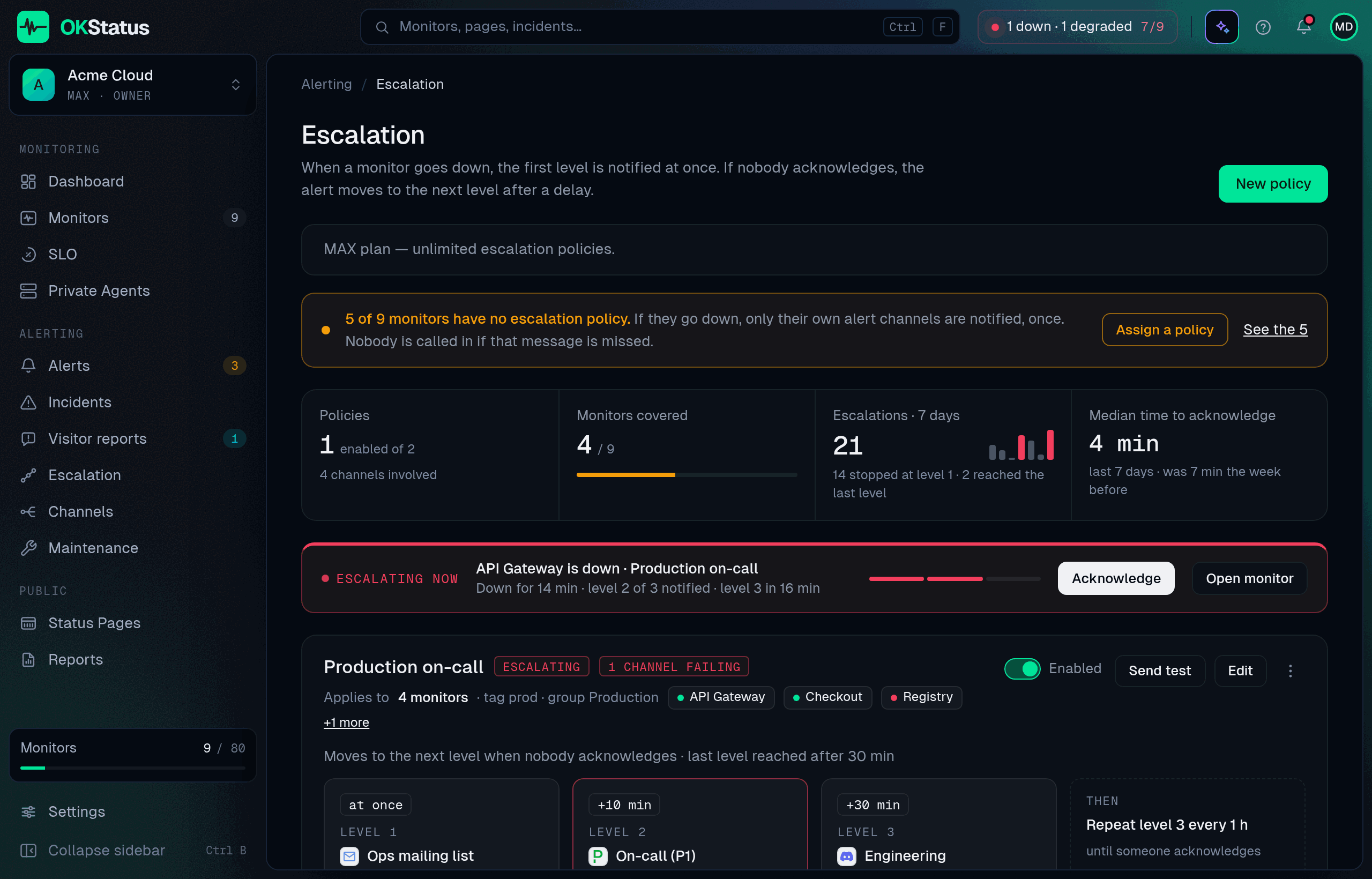
Escalation policies live under Alerting → Escalation. Free and Pro organizations can have one policy; Max and Enterprise have no limit.
The page opens on what matters first: a warning when some monitors have no policy (with Assign a policy), how many monitors are covered, how many escalations ran over the last 7 days and how far they went, and the median time your team takes to acknowledge. While an alert is escalating, an Escalating now band shows the level reached and when the next one fires, with Acknowledge right there.
Anatomy of a policy
Section titled “Anatomy of a policy”| Part | What it is |
|---|---|
| Name | “Production”, “Customer-facing”, “Night shift”… |
| Applies to | Which monitors the policy covers. The All monitors switch covers every monitor, including ones created later. Switch it off to target by tag, by group, or by picking specific monitors — the three add up. |
| Levels | An ordered list. Each level has a delay (at once, or after N minutes or hours without acknowledgement) and one or more channels picked from the ones you already created. |
| Repeat | Optional: once the last level has fired, repeat it every N minutes or hours until acknowledged. Without it, nothing more is sent after the last level. |
| Enabled | A disabled policy is kept but never runs. |
A typical policy:
- Immediately → Slack
#opsand the on-call email. - After 10 min without acknowledgement → PagerDuty.
- After 30 min → the engineering manager’s SMS, repeated every 30 min.
How levels resolve
Section titled “How levels resolve”- Only Down and Degraded alerts escalate. SSL and domain expiry warnings are sent once, to the monitor’s channels.
- Level 1 fires when the alert is raised. Channels that already received the alert because they are attached to the monitor are skipped, so nobody is paged twice for the same event.
- Every minute the engine checks each unacknowledged alert: has the next level’s delay elapsed? If yes, its channels are called and the log shows a Level N badge on the original alert.
- Acknowledging the alert stops the cascade immediately. Nothing after that moment fires. The Recovered notification still goes out through the monitor’s own channels, so the people who were paged know it is over.
- The cascade also stops on its own when the monitor recovers, is muted, or enters a maintenance window.
- If several policies match the same monitor (one by tag, one by group…), each of them runs its own cascade. Keep targets disjoint if that is not what you want.
What it is not (yet)
Section titled “What it is not (yet)”There are no on-call schedules or rotations: a level names channels, not people. Point a level at a channel that already does rotation for you (PagerDuty, Opsgenie, Grafana IRM, incident.io…), and let it own who is on duty.
Good habits
Section titled “Good habits”- Keep level 1 cheap and wide (chat + email), and put the paging channel at level 2. Most alerts are acknowledged before it fires.
- Give Repeat a value at least as long as your longest realistic response time — a 5-minute repeat on a 30-minute outage is 6 pages for one problem.
- Acknowledge from the Alerts log, not by muting the monitor: muting stops the cascade too, but it also silences every future alert.
- Send test on a policy calls every channel of every level once, and tells you which ones failed. Then test the whole chain for real with a deliberately broken monitor, and read the Alerts log afterwards to see the levels stamped on it.