
Alerts from a status page
A status page is not only a display: it carries alerts in both directions. Your users can subscribe to be told about the incidents you post and, if you choose, planned maintenance, and they can report a problem your monitors have not caught yet.
Subscriptions — you notify your users
Section titled “Subscriptions — you notify your users”- The visitor clicks Subscribe at the top of your status page — or uses the Get notified form at the bottom — and enters an email address.
- They receive a confirmation link. Nothing is sent until they click it (double opt-in).
- From then on, they get an email on every new incident and every incident update (identified, monitoring, resolved) that concerns that page — an incident reaches the subscribers of the pages showing one of its monitors, and nobody else.
- Every email carries an unsubscribe link. Subscriber addresses are stored by OKStatus for this purpose only and never shared.
Subscriptions are handled entirely by OKStatus — no mailing tool to configure. The subject line is [<status page title>] <incident title> — <status>, and each subscriber receives the email in the language and time zone of the browser they subscribed from. On Enterprise, the email carries the page’s own name, logo and accent colour.
Visitors who would rather not leave an address can follow the page’s RSS feed, linked next to the form and in the Journal section.
Subscriptions are on by default. In the page settings, under Allow visitors to subscribe, tick what the page sends: Incidents (on by default — when you open one, at each update you post, when you resolve it) and Planned maintenance (off by default — when you schedule a window that starts more than an hour later, when it starts, when it ends or is cancelled; only the windows covering a monitor of the page). The form and the confirmation email say exactly what was ticked. Untick everything, or the main switch, and the form and the Subscribe button disappear, signups are refused, and existing subscribers receive nothing until you turn it back on — they are kept, not deleted. The settings also show what one incident or one maintenance costs in emails for the page’s current subscribers.
These emails only follow what you publish. A monitor going down, degraded or slow on its own never emails subscribers — a flaky check stays on the page, not in their inbox. Post an incident when your users need to hear about an outage.
How many subscribers a page can have
Section titled “How many subscribers a page can have”Each status page takes up to a number of confirmed subscribers that depends on your plan. A pending signup doesn’t count.
| Free | Pro | Max | Enterprise |
|---|---|---|---|
| 100 | 1,000 | 5,000 | 10,000, raised on request |
The Subscribers column of the Status Pages list shows each page against that cap. The owners and admins of the organisation get one email when a page reaches 90 %, and another when it is full. A full page keeps everyone already subscribed — they still get every update — but its form tells new visitors it isn’t taking subscribers; the RSS feed stays open. Moving to a lower plan never unsubscribes anyone: a page above the new cap just takes no one new.
The same address can subscribe to a page only once. Signing up again resends the confirmation link if it was never clicked, and sends nothing otherwise.
Issue reports — your users alert you
Section titled “Issue reports — your users alert you”When Allow visitors to report an issue is enabled in the page settings (it is by default), the public page ends with a Something looks wrong? form. A visitor fills in their email, optionally the affected service, and a message.
The report reaches you in three places:
- an email to the organisation owner,
- the bell in the dashboard top bar, and the badge on Visitor reports in the sidebar,
- the Alerting → Visitor reports page, where they stay until you handle them.
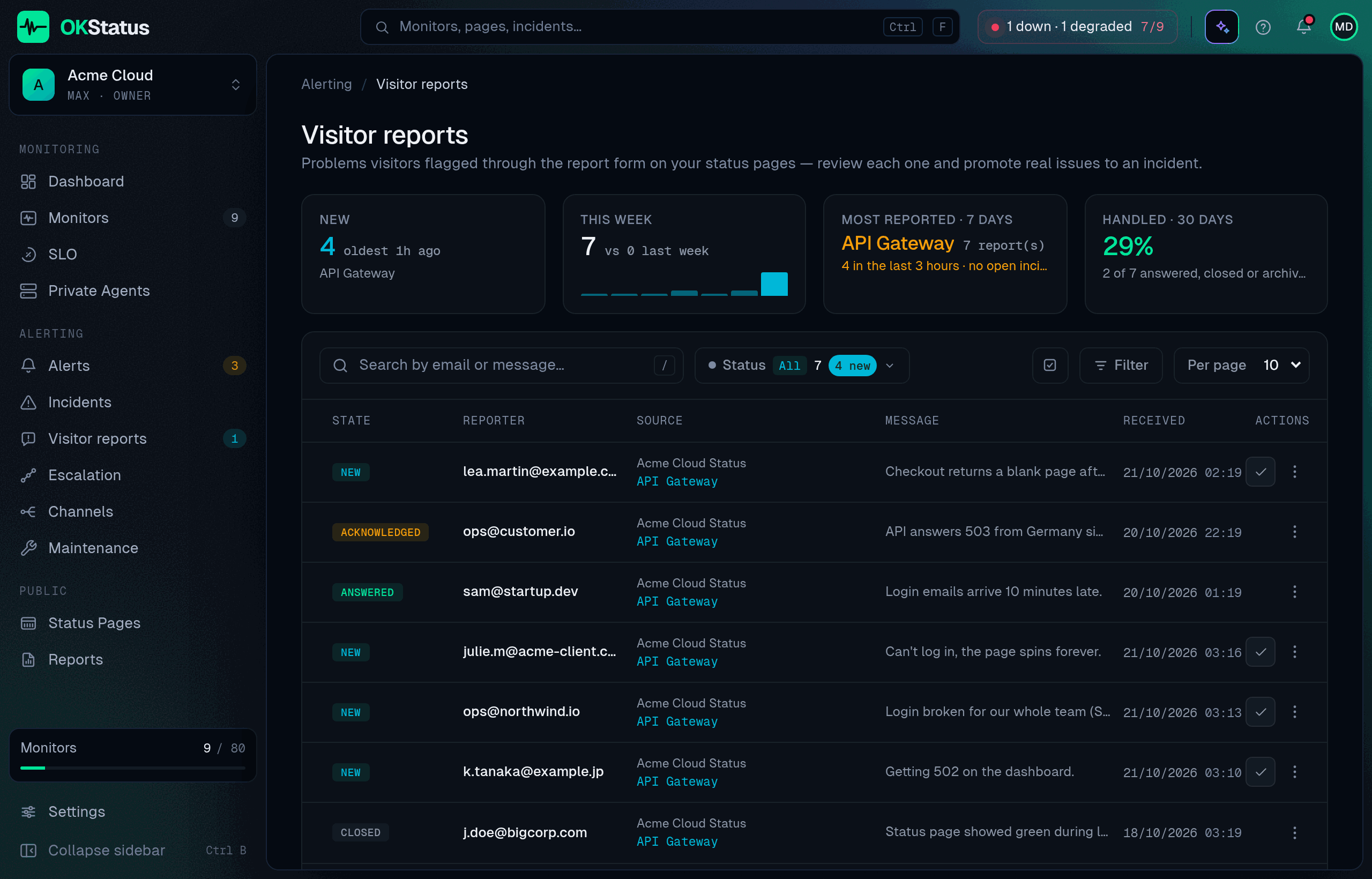
Each report carries a state — New, Acknowledged, Answered, Closed — that you move from its menu, and can be archived; several can be acknowledged or archived at once. The tiles above the list tell you how many are new and how old the oldest is, how this week compares with the last, which service is most reported (and whether an incident is already open for it), and the share you handled over 30 days. A burst of reports on one service with no open incident is the pattern to look for.
Reports are clearly labelled as visitor-submitted. They are a signal, not a confirmed outage: check the monitor, then declare an incident if it is real, and mark the report answered or closed. The endpoint is rate-limited by IP address to keep abuse out.
Badges and the floating widget
Section titled “Badges and the floating widget”The status badge and the floating status widget are one-way: they show live monitor status inside your own site or README and never send anything. Use them when a page in your product should reflect your status without people having to subscribe.