
Instant PDF Reports
Overview
Section titled “Overview”OKStatus generates SLA availability reports as PDF. They’re ideal for:
- Sharing SLA metrics with your clients.
- Documenting service reliability for audits.
- Giving your team a monthly recap.
There are two ways to get a report: build one instantly (this page) whenever you need it, or set up a scheduled report that’s emailed automatically on a recurring basis.
Report content
Section titled “Report content”Every PDF report gives, per monitor, the uptime over the selected period measured against your SLA target. Four sections can be switched on or off per report, under Include:
- Incidents — timeline and duration of the incidents of the period.
- Performance — response time percentiles.
- SSL certificate — expiry date.
- Domain — expiry date of the domain’s registration.
Templates
Section titled “Templates”The same data comes in three templates:
| Template | What it looks like | Plan |
|---|---|---|
| Basic | One block per monitor. The simple one. | All |
| Summary | A one-sentence verdict, then one page per monitor. The default. | All |
| Audit | Dense, every incident logged — written for an auditor or a contract review. | Enterprise |
Building an instant report
Section titled “Building an instant report”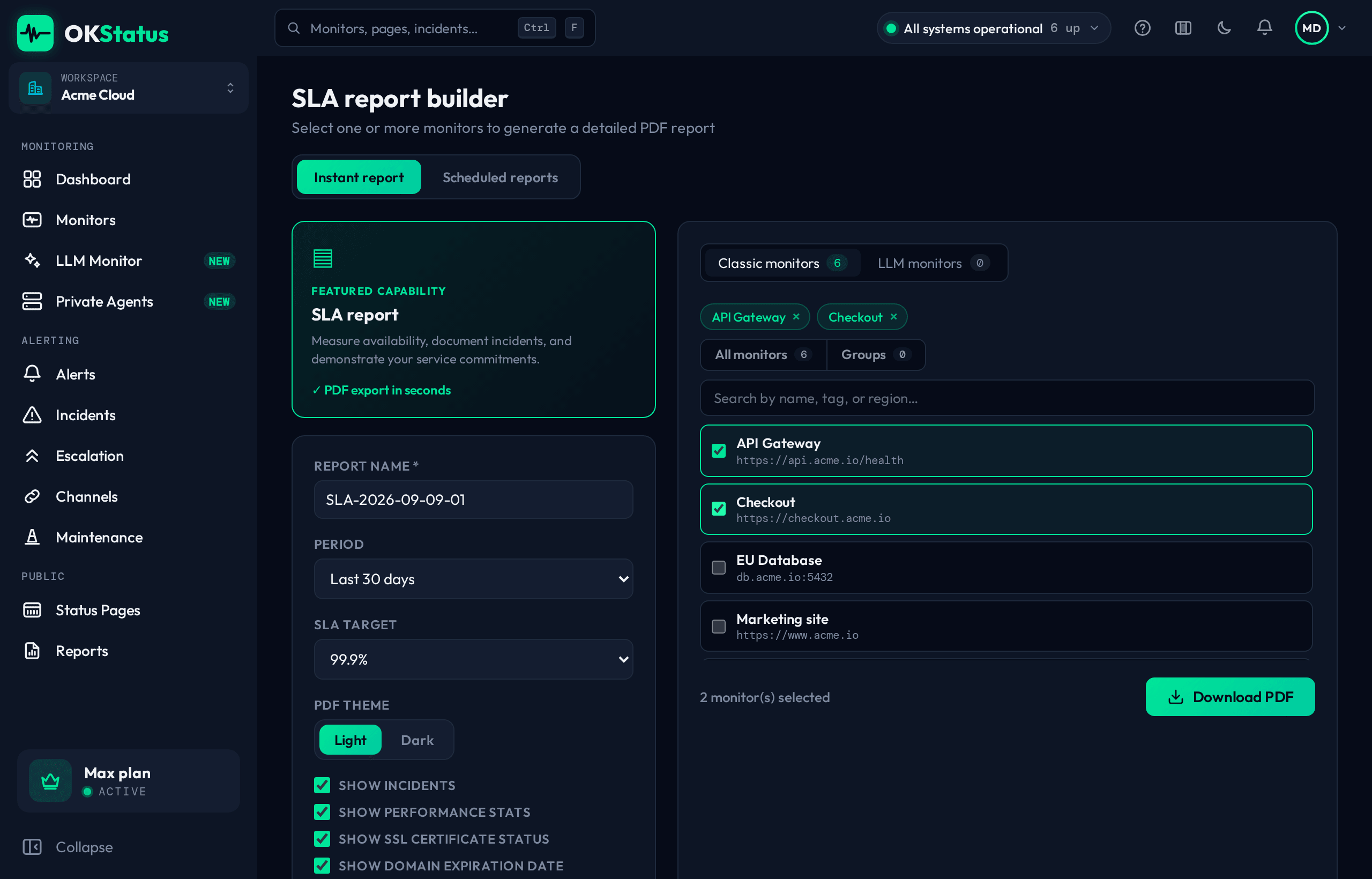
- Go to Reports — you land on the Download now tab.
- On the left, select the monitors to include. Search by name, tag or address, switch between Monitors and AI models, or use Quick select: all, the monitors below target, a tag, or a group. Each row shows the last 30 days at a glance.
- On the right, pick a period: a preset (previous day/week/month, last 7/30/90/365 days), a quarter, or a custom date range.
- Set the SLA target (99 % to 99.99 %) used to mark each monitor as meeting or missing its target. It starts at your organisation’s target.
- Choose a template and the sections to include. The page count is estimated as you go.
- Click Download PDF.
The PDF is generated server-side and downloads directly — no waiting for an email. On Max and Enterprise, Schedule this… turns the same selection into a scheduled report.
A single monitor’s report is one click away from its own page too: PDF report exports the range displayed there.
How many reports you can build
Section titled “How many reports you can build”The on-demand builder is available on every plan, with a monthly quota:
| Plan | On-demand reports / month |
|---|---|
| Free | 1 |
| Pro | 5 |
| Max | Unlimited |
| Enterprise | Unlimited |
The counter resets on the 1st of each month (UTC). Generation is also rate limited to 3 reports per minute per organization — building a PDF spins up a headless browser, so bursts are capped.
Scheduled reports, which build and email themselves, are a Max feature and are not metered.
Next step: automate it
Section titled “Next step: automate it”If you find yourself generating the same report every week or month, turn it into a scheduled report instead — same content options, delivered by email on the cadence you choose.